website › main
builtin 2m 14sno expiry
A live, disposable environment for every branch and pull request.
Trusted by

A Web Environment Manager between Git and Docker — disposable previews with the services, data, and tests each branch needs.
Add it to Qaack and pick your platform. A dedicated deploy key and the webhooks are set up for you.
Creating a repositoryOne qaack.yml declares your services, build commands, variables, tests, and one-click actions.
Qaackfile referenceservices: web: image: qaack/nginx-php81 checkout: true commands: provision: - composer installtests: lighthouse: threshold: 80Every branch, tag, and merge request shows up as an available environment. Filters decide which ones count.
Syncing and webhooksPush and Qaack rebuilds. Open the HTTPS link and review a real site — HTML, assets, and data included.
Open the panelSummer collection
HTML, assets, and data — the same experience reviewers and QA will see.
Shop nowFrom unique URLs to Lighthouse and reusable snapshots — the features teams actually use after the first demo.
Each branch and pull request gets its own HTTPS URL — copy it, share it, or open the live preview in one click.
Summer collection
HTML, assets, and data — the same experience reviewers and QA will see.
Shop nowRun checks where the app actually lives. Compare a pull request against its target branch and catch visual and performance regressions before merge.
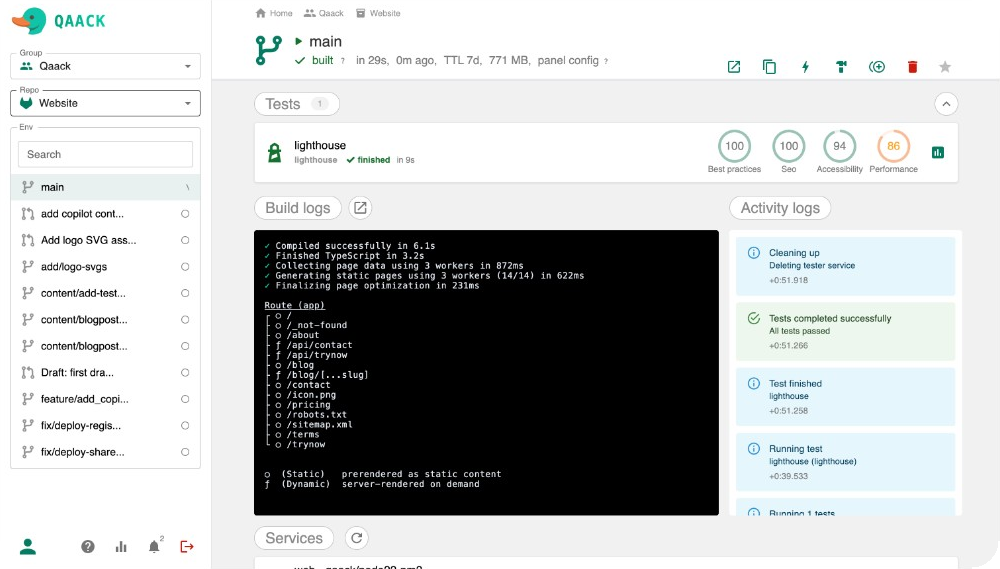
lighthouse
Performance
Accessibility
Best Practices
SEO
playwright
12/12 passed
visual-regression
Match Ratio
Checkpoint after npm ci or composer install, then spin later environments from that snapshot. Schedule rebuilds so the base stays fresh overnight.
Scheduled rebuild
Define commands in the Qaackfile — dump a database, print a report, or download an artifact. Run them in one click from the environment view.
TTL, webhooks, token rotation, locked services, and soft rebuilds — tune how environments are created, refreshed, and retired without touching the deployment pipeline.
Webhooks
TTL
Token rotation
Locked services
Soft rebuild
Open a shell on any service — web, database, worker — with logs and terminal access right from the panel.
Stream output from every build step in the panel — or pull them with qck buildlogs. See which command failed, how long it ran, and what the environment was doing.
qck follows your current branch. Build, status, logs, launch, and console — on macOS, Linux, and Windows.
Connect Claude, Codex, or other MCP clients. Agents can browse environments, rebuild, run commands, and spawn previews — same access as the panel.
$ claude mcp add --transport http qaack https://panel.qaack.cloud/mcp
Quality Assurance ACKnowledgement — preview, test, and demo without waiting on a shared staging server.
The public panel is free to start. Self-host or go enterprise when you need a private instance.